Apps and Services#
The headline items for M365 Business Premium are:
- Exchange Online P1
- OneDrive P1 (1TB) Per-user
- SharePoint (1TB per-company + 10GB per additional licensed user)
- Teams
- Microsoft 365 Desktop Apps
- Entra ID P1
- Intune P1
- Defender for Office P1
- Defender for Business
- Purview (partial)
See M365 Maps for the full listing
Microsoft 365 Business Premium Security Service#
When a company is breached, it is most often a misconfiguration that is at fault. It is rarely the product choice. If you pay close attention to the configuration of what you have, you'll be able to prevent almost all forms of business compromise. I strongly believe that M365 BP alone is enough for most businesses (assuming they are under the 300 seat limit).
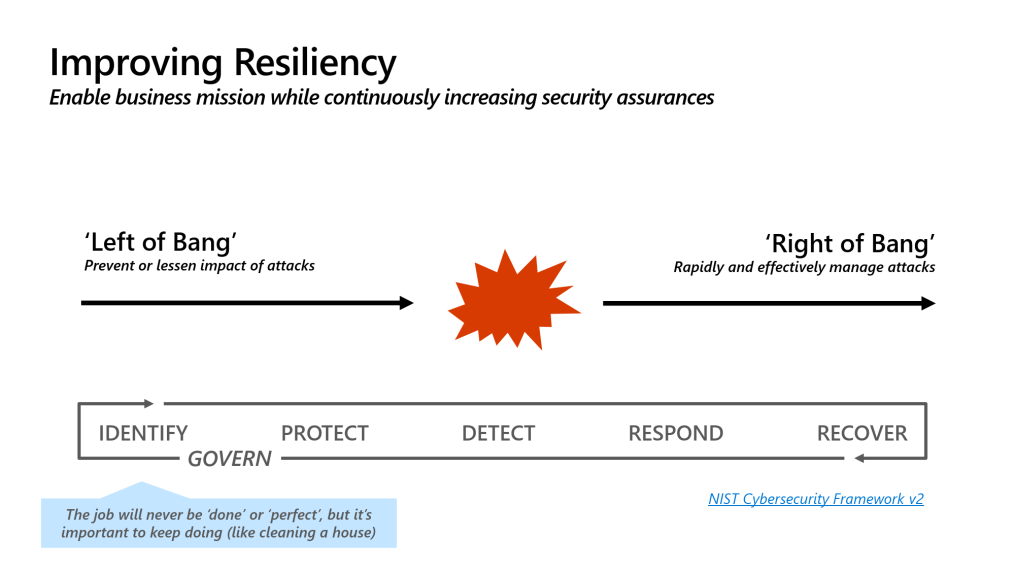
Take a look at the above graphic. Most of the cyber security industry, marketing, and product space is heavily weighed to serving the middle or "right of bang". It's easier to garner attention from a dashboard which is red, or a noisy alert in ticket feeds or PSA tools, and get the rush of the "in the moment" recovery and remedial activities.
It's what most buyers are happy buying and what most vendors are happy selling. When we look at the root causes of most of what these tools are doing, we realise they are actually just safety nets for poorly configured environments. You are much better off spending resources on preventing an attack than detecting and responding to it.
Some examples we see a lot:
- Bypass of Conditional Access policy because a C-level said they wanted to work from their Macbook from the beach
- Inadequate controls to prevent AiTM (Attacker in The Middle) scenarios
- Something ran as Local Admin - Nobody should be a local admin
All of these scenarios, and many more critical protections can be delivered only using M365 Business Premium.
How does Microsoft 365 Business Premium prevent attacks?#
Step 1: Entra ID P1#
You must secure your identities. It is your number one priority.
"What about Security Defaults?"
They don't do a good enough job. Security Defaults leave the login decision to Microsoft. You know your company and access rights better than they do; their "black box" signals sometimes get this wrong and may allow an unauthorised sign in.
Entra ID P1 is the critical minimum for all users using anything Microsoft. It is licensed per-user, and forms part of M365 Business Premium.
You should configure Conditional Access policies
Step 2: Defender for Office 365 P1#
Most businesses are still compromised via email, Business Email Compromise. Defender for Office 365 is actually very good when configured properly.
It has classically been the default choice to outsource email security to another vendor. You simply don't need to do this now if you configure DFO well enough. Start with the basics: Clean up SPF/DKIM/DMARC, then head back to the M365 Security Portal to finish DFO. There are some great techniques listed here if you think you've done the basics.
Step 3: Intune P1#
Intune is probably the single best endpoint security for tool for Windows that exists on the market today. Some of you might be reading that and questioning it. Isn't Defender the security product from Microsoft? Yes, but Defender is your safety net remember. We want to prevent things getting as far as the AV tool.
For years, my answer hasn't changed here, start with the Open Intune Baseline , this is easily the best Windows baseline that exists on the internet. With the ASR rules on Block Mode, the device Secure Score will be about 90%. To see what's included in the Open Intune Baseline, see this tool (that site also has a browser for the entire Intune Settings Catalog).
Is Intune the same as Autopilot? What about Autopilot Device Preparation?
Step 4: Defender for Business#
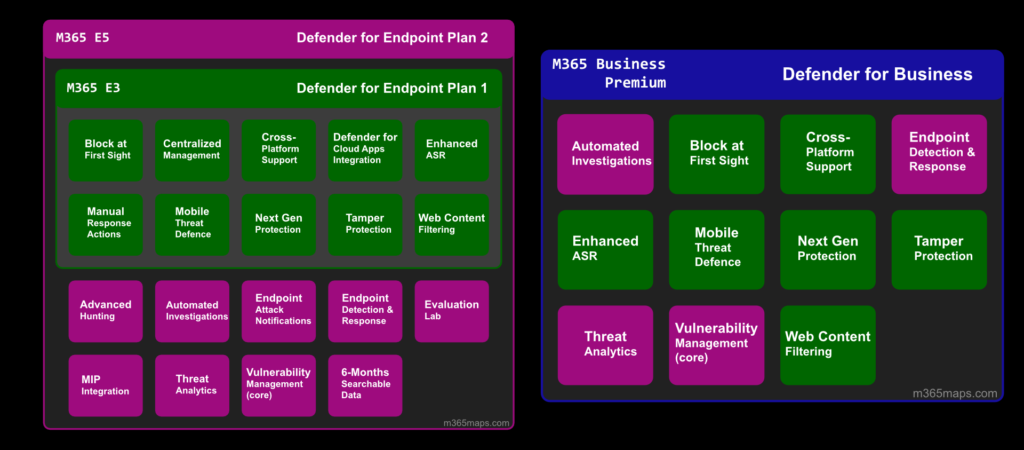
DfB is a market-leading AV and EDR solution. But is it good enough? I answer that question here. No matter which flavour of Defender for Endpoint you buy, the AV component is the same right from consumer Windows Home, to full M365 E7 with Defender P2. The difference as you scale through the pricing is EDR and how much insights and response you get out of it.
Did you know DfB contains Cloud App Discovery? Shadow AI is all the rage nowadays, use Defender to get some insights on who is using Claude and DeepSeek.
Step 5: Purview#
Data governance tools; Data Loss Prevention and Information Protection
Do not start here. If you do, you are wasting your time. If the goal is to prevent data loss, but I can sign in to my home laptop using the work account, Purview is not going to save you.
Being totally realistic about Purview at this level, you can get an initial taste of it, but to be usable it needs some automation. Consider the Purview Suite for Business Premium
We're only scratching the surface#
There isn't as much of a difference between M365 BP and E5 as you think. The "E" does not add extra configuration to prevent your business being attacked, that bit is on you.
If you want more ideas about the complete protection you can provide in the consolidated stack, I made a checklist for that.