The M365 Business level of license is an entry-point to commercial Microsoft products and services for many. Licenses bearing the 'Business' prefix are limited to 300 across the SKUs. For example, you could have 100 Business Basic, and 200 Business Standard and hit the limit defined in the service agreement. The system might let you buy 300 of each, but the rules state it's 300 across Basic/Standard/Premium.
Today we're going to focus on the jump to Premium.
Why people buy Business Standard#
It's usually because they want M365 Desktop Office apps. Business Basic will get you web apps, but most want desktop apps, therefore Standard is a cost effective way of getting those apps we all know and love, plus the now 100GB mailbox in both Basic and Standard (as of July 2026), and the 1TB OneDrive storage per-user. Standard is an easy sell to end-users because most of the value is in the products they directly interface with day-to-day.

Even just looking at those icons, it's easy to see why people think: "yes those are the familiar things I need to run my business", and as a result Standard is a much easier sell.
When we look at what's added with Premium, we get the much less familiar icons which represent the security and data governance "back office" functions.
You can build an entire security service and offering backed by the four main security products offered here: Intune, Entra, Defender XDR & Purview

A more concise view of feature comparisons can be found on M365 Maps
What's the rest of the business doing?#
The productivity benefit of Business Standard is obvious, but that's just one area of what a modern, remote-working business needs to function.
No prizes for what this quickly moves onto... Security
From what I've seen, companies who opt for Standard as their primary M365 license for all users usually fall into one or more of these camps:
- They don't have any concept of cyber security whatsoever and operate in complete ignorance or wild abandon
- They do understand cyber security, and for the identity part, abuse (or their MSP abuses) Entra ID P1 by purchasing a single license for the whole tenant (it's meant to be one per user)
- Use a third-party stack of security tools
License Compliance#
If we assume that you wanted Business Standard + Entra ID P1 for all users.
| License | Cost |
| M365 Business Standard | £10.80 /month on yearly commit |
| Entra ID P1 | £5.40 /month on yearly commit |
| TOTAL | £16.20 in total /month |
Business Premium is £16.90 /month on yearly commit. 70p difference. Remember that as we go through this post.
The problem is that most people operate without Entra ID P1, let's explore that
Security Defaults#
On non-premium licenses (or tenants that only have Entra ID Free), Microsoft will enable "Security Defaults" on new tenants. That is a collection of non-configurable controls which is enabled for every user in the tenant. If you want to change them for even a single user, big switch is off for everyone; it does not support any granularity. The defaults are:
- Requiring all users to register for multifactor authentication
- Requiring administrators to do multifactor authentication
- Requiring users to do multifactor authentication when necessary
- Blocking legacy authentication protocols
- Blocking device code flow
- Protecting privileged activities like access to the Azure portal
Wanna know what "when necessary" means?
After users complete registration, they'll be prompted for another authentication whenever necessary. Microsoft decides when a user is prompted for multifactor authentication, based on factors such as location, device, role, and task. This functionality protects all registered applications, including SaaS applications. - Microsoft Learn
If you have Basic or Standard, you are significantly more exposed to cyber attacks than someone with a Business Premium license with well configured Conditional Access policies.
You've heard the phrase: Identity is the perimeter. Almost all business compromises are a result of poor login controls. But don't take my word for it, you can read more about this in the 2025 Microsoft Digital Defense Report. One Redditor found out the hard way that Security Defaults don't protect the business like you would:
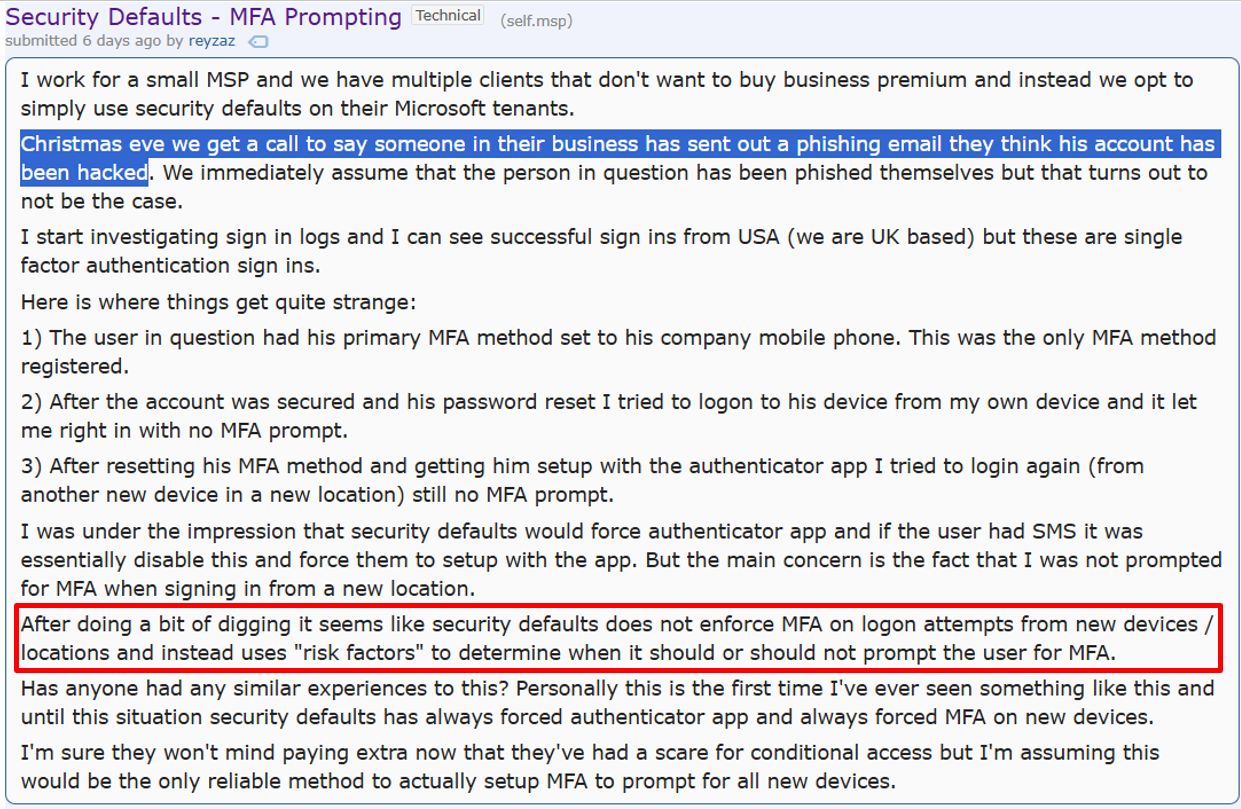
The red section proves the black box theory that is Security Defaults.
The third-party stack#
I know what you're thinking. We run Business Standard, then add on multiple third-party products to increase the number of layers in our security stack onion as to... not put all our eggs in one basket.
The "eggs in one basket" phrase sounds good on paper, but is horrendously overused and under-justified when it comes to modern cyber security practices. It's not 1995 anymore where Microsoft aren't a security company and third-party is the only choice. Microsoft XDR, and specifically Defender for Endpoint is good enough to the point where your entire core security stack can be Microsoft-provided. The more of the Microsoft security products you use, the better the data becomes during an incident. You become enriched within the umbrella of Microsoft Defender XDR - signals from Identity, Email and Endpoint can be combined to give you one complete picture of what's going on during a response task.
The alternative is to have a separate product for each problem, again a very common carry on from the 1990s. This leads to a few problems, which compound in an MSP setting.
Imagine I have this setup:
- A client base using mostly Windows
- Third party IDP (identity provider)
- Third party Antispam
- Third party Antivirus
- Third Party EDR
When I get an alert from any of those systems, how quickly can I know if any other part of this chain is impacted? For a team of dedicated SOC analysts who ingest all logs into a central SIEM and have automations configured, this is less of a problem but they sure as hell wouldn't be using Business Standard as a base license.
Imagine I'm a L2 or even L3 tech at an MSP who does not have a cyber security background, and my career progression is mostly guided via Google-fu. If I was being right by the client, I should fully understand how tools spanning 4 separate vendors should be configured, keep updated on changes they make, deploy them at-scale, and know exactly how to operate and respond using those tools whenever an alert comes in. And if the alert comes in at Endpoint, how do I know that Email wasn't the entry point?
That stuff takes time to figure out, and time is finite during an active incident. As Marco Pierre White says, 15 seconds is a lifetime in the frying pan (he was referring to fish btw).

To date, I have never seen a single security product configured optimally in any client environment, ever. So when I hear about (mostly MSPs) who treat their "security stack" count as a badge of honour I think, man, that ain't the flex you think it is. What that tells me is you've got 5+ products that very likely aren't being used correctly, and any new member of staff who joins that company is expected to "hit the ground running" and figure it out on the go. Is that the level of expertise your clients are paying for?
The bigger your stack, the more items your job descriptions must move from Required to Desired.
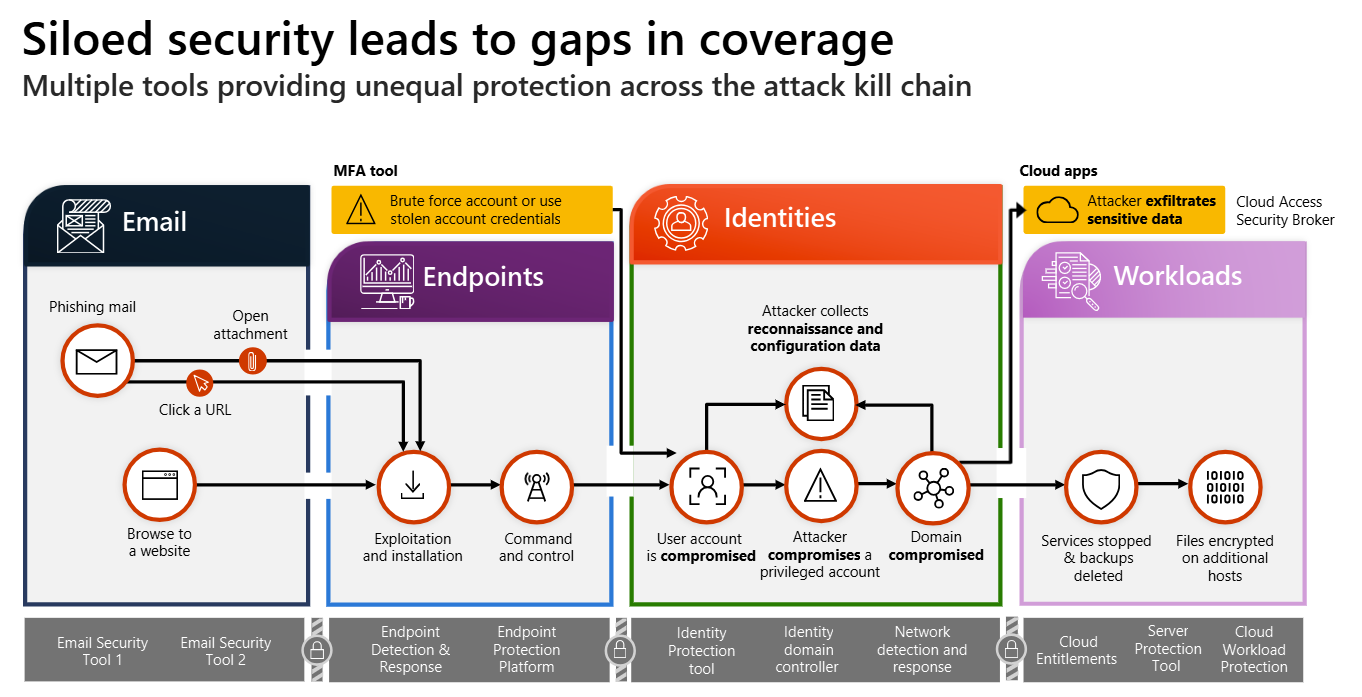
My motivation several years ago was to cut this noise out, focus mostly on one vendor, and get really good at that one thing. Turns out, that most breaches aren't a result of poor tools, but rather poor configuration of those tools (hey someone should start a company that helps with that). A lot of large Enterprise customers have figured this out, and thanks in part to the huge volume discounts they get directly from Microsoft to have M365 E5, they are actually using the products within that SKU.
Have you ever stopped and wondered why you don't hear of large Fortune 500 companies using Webroot or Heimdal? It's because their teams have learned how to configure the Microsoft XDR stack, or other enterprise products. What you might not know is there isn't a huge leap in capability from what a customer can benefit from inside M365 Business Premium compared to M365 E5.
- Defender AV is the same, EDR is less controllable, but it's the same one the banks use
- Those core antispam protections offered by Microsoft Defender for Office 365 P1, the same as you get with E5
- Entra ID Conditional Access policies, same again (with some P2 risk-based exceptions)
At your fingertips you have access to a security suite built for enterprise, distilled into the unbelievably good value SKU that is M365 Business Premium. The 300 seat limit serves as a strategic cap for Microsoft, but in most MSP spaces for the clients they deal with, that doesn't matter anyway. They even made two add-ons for BP if you want the full E5 security, but for SMB.
Business Standard isn't good enough.#
I've linked to a lot of other resources in this post, some are mine, some are external. Go check them out.
M365 BS is not good enough as a sole security offering for Identity, I think providers who only offer Microsoft Security Defaults are providing a borderline negligent service for their clients; if the concern is budget that's a different conversation which I won't dive into here.
If you are a service provider, it should be made contractually and unequivocally clear to business owners who are operating on Business Standard that the security of their Microsoft tenant, company, and potentially the livelihoods of all who work there, is left to an uncontrollable black box that one day might make the wrong, company-destroying decision.