Antivirus is a staple product of the cybersecurity checklist which has matured over decades. We all know we need AV, but in this post, I'm making the point that the best one is the one you already have.
At this point, you might roll your eyes and conclude that I am a Microsoft shill and therefore I'm blinded by being an MVP, and that I have a selfish interest in defending (no pun intended) Microsoft products for the core sake of retaining MVP status and all the career benefits and speaking opportunities that have come with it.
That really couldn't be further from the truth.
I am very vocal to Microsoft product programme managers, marketing, team leads, and even CVPs when I get the chance about what I think is good, and what I don't think is good. For example, at the time of writing, I do not feel that Windows 11 is in a good place. I've made my concerns heard to the right people at Microsoft, and time will tell if they're able to pull it back. Until then I will primarily use Windows for work, while I am newly discovering - and very much enjoying - macOS for my personal computing needs.
Microsoft is a security company#
And it has been for a while. If you speak to real security experts who've been in the game for a while (not frauds like me), they will openly tell you that a decade ago, using Microsoft Defender ATP (or whatever the early name of the endpoint security product was back then), was a poor choice. It cannot be understated how much this has changed in such a short time.
Microsoft's security business passed $20bn in annual revenue years ago, and IDC has repeatedly ranked Microsoft #1 worldwide in modern endpoint security market share by revenue.
I was also of the opinion that on every new build of Windows, you needed to go out and add a third-party AV. Whether that be Kaspersky, BitDefender, F-Secure, or Avast! etc. As time has passed, if MS Defender was not an option, today I'd likely consider SentinelOne, or CrowdStrike. I'm not unaware of what competition Microsoft Defender has, but I'm of the opinion that Defender for Endpoint is not just good enough, but it's rock solid and widely misunderstood by people expecting a turnkey solution.
If you implement a turnkey solution, expect a turnkey breach.
I didn't come to the conclusion that Defender for Endpoint is good based on emotion, it's a view I hold shaped by the understanding of the facts I've been presented with.
Pure Facts#
Microsoft collect more security telemetry than anybody else.#
Windows 10/11 is on over 1.4 billion devices. That is an enormous sample size that nobody else can compete with. It spans all Windows Home devices that the children in your family use to download suspicious Roblox mods, all the way up to Windows Enterprise devices used by military officials, governments, spies, and the world's billionaires. The breadth of userbase here uniquely positions them to spot emerging threat patterns and update their threat intelligence for implementing blocks.
Microsoft processes more than 100 trillion signals daily, blocks approximately 4.5 million new malware attempts, analyses 38 million identity risk detections, and screens 5 billion emails, and that stream is monitored by a global team of 34,000 security professionals - Microsoft Digital Defense Report 2025
Microsoft own the operating system.#
They have the closest relationship between kernel, drivers, software, and therefore having the biggest knowledge and timing advantage as changes are made. Yes other vendors are invited in to have kernel-level drivers, but we all remember what happened when CrowdStrike's testing negligence caused global disruption across 8 million impacted devices.
Defender for Endpoint has a strong track record of winning security awards run by independent security and testing bodies:#
- A Leader in 2026 Gartner Magic Quadrant for Endpoint Protection for the seventh consecutive time
- Leader in the Forrester Wave: Zero Trust Platforms, Q3 2025, ranked highest in strategy, with Forrester noting Microsoft excels at tool consolidation and integration
- Microsoft delivered 100% protection in the 2024 MITRE ATT&CK evaluation, and Defender XDR demonstrated 100% detection coverage across all attack stages in the 2024 MITRE ATT&CK. Microsoft continues to participate in many independent security tests.
- Defender for Endpoint passed the AV-Comparatives 2025 Anti-Tampering Test
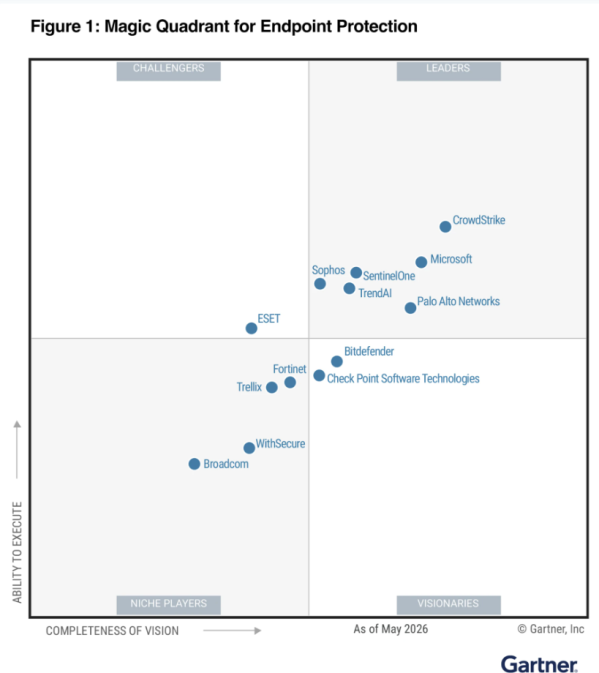
These awards are not bought, but earned*. The most bizarre thing I see on the internet are decision-makers opting for AV/EDR solutions that don't sit in top-right, don't win or even place in any of these other awards, yet remain defiant on the view that "MS Defender isn't good enough". They do not invest any effort into explaining why their chosen solution is better than Defender, but instead peddle now decade-old rhetoric about how Microsoft can't possibly be taken seriously to do security.
If you had to form a list of things a security vendor should do to gain legitimacy in its product, I'd be keen to understand what is missing from Microsoft's activities to make the cut.
But like any security company, Microsoft aren't perfect themselves, however they are also (plausibly) one of the most attacked orgs on the planet. There have been some big oopsies like Storm-0558, Midnight Blizzard, or the CSRB Report which ignited the touchpaper internally, eventually leading to the Secure Future Initiative. The idea being that security is pegged above features across all products, at all times.
*okay well maybe there is a really long and expensive process to gain entry and be evaluated, but you get the point.
My Observations#
I used to work for an MSP that has an award-winning MSSP division and runs a 24/7 SOC. You know what they use? Microsoft Defender.
I have MVP friends all over the world who work in larger international threat hunting teams who run massive operations using telemetry, tools, and response provided solely by... you guessed it, Microsoft Defender.
Within the MSP circles I frequent, many security-minded companies bolt-on Huntress as an additional response and security opinionated service to assist the protection of their clients, guess which AV they recommend as a base solution? Microsoft Defender.
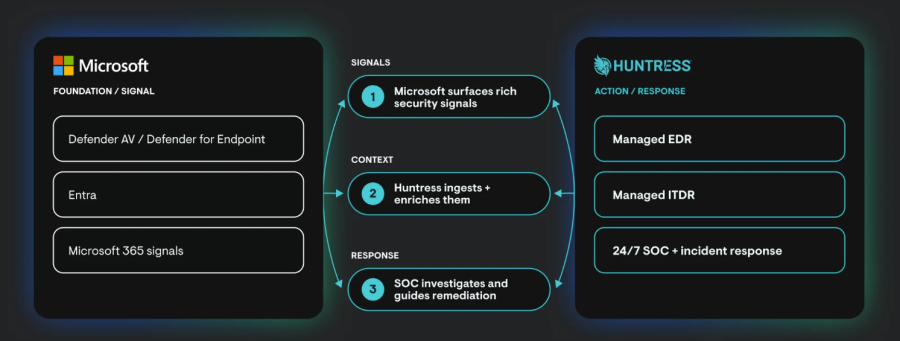
Another example is Sophos, a direct competitor to Microsoft Defender, now has a service that integrates and compliments what is surfaced by Microsoft Threat intel: Sophos Launches Managed Detection and Response (MDR) for Microsoft Defender to Provide a Critical Layer of Security Across Microsoft Environments | Sophos
They've even gone to the effort of becoming a verified SMB Solution through the Microsoft Intelligent Security Association. When a rival decides the better move is to use Defender's telemetry than insist to replace it, that is clear admission that the underlying tech is good enough.
"Sophos MDR for Microsoft Defender integrates telemetry from a broad range of Microsoft Security tools"
Personally, seeing all that, then deciding to pay for something like Webroot, is an absolutely insane play when it's provably worse than doing nothing at all.
Nothing at all#
(ned flanders meme)
We're talking Windows here, but it should be pointed out that Defender for Endpoint is a core component of the Windows operating system. You cannot remove it, you cannot even truly disable it, even in "passive mode".
The core Antivirus component in Windows is the same one across Windows Home, all the way up to full-blown M365 E7 with Defender for Endpoint P2. The capability of the combined XDR stack does improve overall the ability for the investigations to take place to remediate - since it has more context across identity and email etc. An example of this was used as a case study in the Microsoft Digital Defense report 2025:
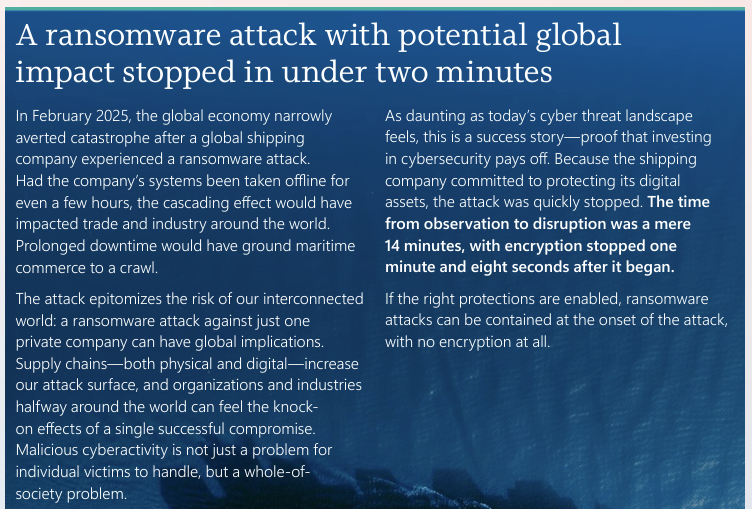
The distinction of Home/AV/EDR/MDE is often overlooked and does cause confusion. It is not a fair comparison for unconfigured Defender for Endpoint running on a home device to be compared to a device that's been onboarded to a licensed Microsoft Security Portal. The latter has a lot more context and has cloud-driven threat remediation abilities.
'Defender XDR' is the umbrella term for the combination of Microsoft Security products working together within the same tenant. If we follow a typical business email compromise, that means it could contain signals from Defender for Office, Defender for Identity/Entra ID risk and Defender for Endpoint depending on how far the chain gets.
How does EDR happen?#
As we now understand, Defender in an unmanaged state is always there, protecting Windows with its default settings, but you don't get the security portal views of the data it is collecting. When you onboard a device to a tenant's Microsoft Security Portal, you are forming a relationship between that device's telemetry and your M365 Security Portal instance. The EDR Sense component is downloaded, activated, and your device logs begin shipping to the tenant.
EDR as a cloud remediation feature is not included with every license. It's there with Microsoft 365 Business Premium (see what else is included) and M365 E5/7, but NOT M365 E3. The key word is "cloud" here. The sensor is always local and always shipping logs to your tenant; the licence determines whether the cloud builds EDR on top of what arrives and how much of it you're allowed to see. In M365 BP you can see timeline events surrounding an incident; in M365 E5/7 you can see a full device timeline, whereas in M365 E3 you have no options for automated investigation and response, or any timeline views at all.
Drifting back on topic...#
I could continue this track of trying to technically explain how Defender works, but this blog post isn't really designed to meet that need. If you want to truly appreciate how sophisticated Defender for Endpoint is, I highly recommend checking out the new, Second Edition of Microsoft Defender for Endpoint in Depth.
What you might not know#
Unlike a lot of other Antivirus software on the market, Defender is highly configurable. This means it has potential in your environments to be highly unconfigured, or rather, it doesn't have a good desired state enforced by something like Microsoft Intune.
A default setting, even a good one, is not the same as it being enforced. For Defender, many of these settings cannot be changed when Tamper Protection is enabled. TP enforces a known set of sensible defaults to ensure constant protection which cannot be altered by other software (or even admins) on the device.
There are many components which live under the Defender for Endpoint category, each should be configured to the correct requirements to guarantee a strong setup... But don't run away, it's your job to understand this stuff to protect you clients.
How many of you sell "managed antivirus" but don't actually manage the antivirus, or just rely on the third party product's marketing that they have somehow done something earth-shatteringly unique?
This stuff doesn't take long to understand, the configuration rarely changes, but getting it right sets you apart from the others out there claiming to be doing endpoint security.
Defender areas you should look at (resources at the bottom)#
If you aren't owning these areas already, then I don't think you have the right context to criticise Defender for Endpoint as an AV/EDR product in your cross-vendor comparisons.
I'm keeping this brief and generalised on purpose, since the nuances and updates to some of these components do change over time.
1. Security Portal Advanced Endpoint Settings
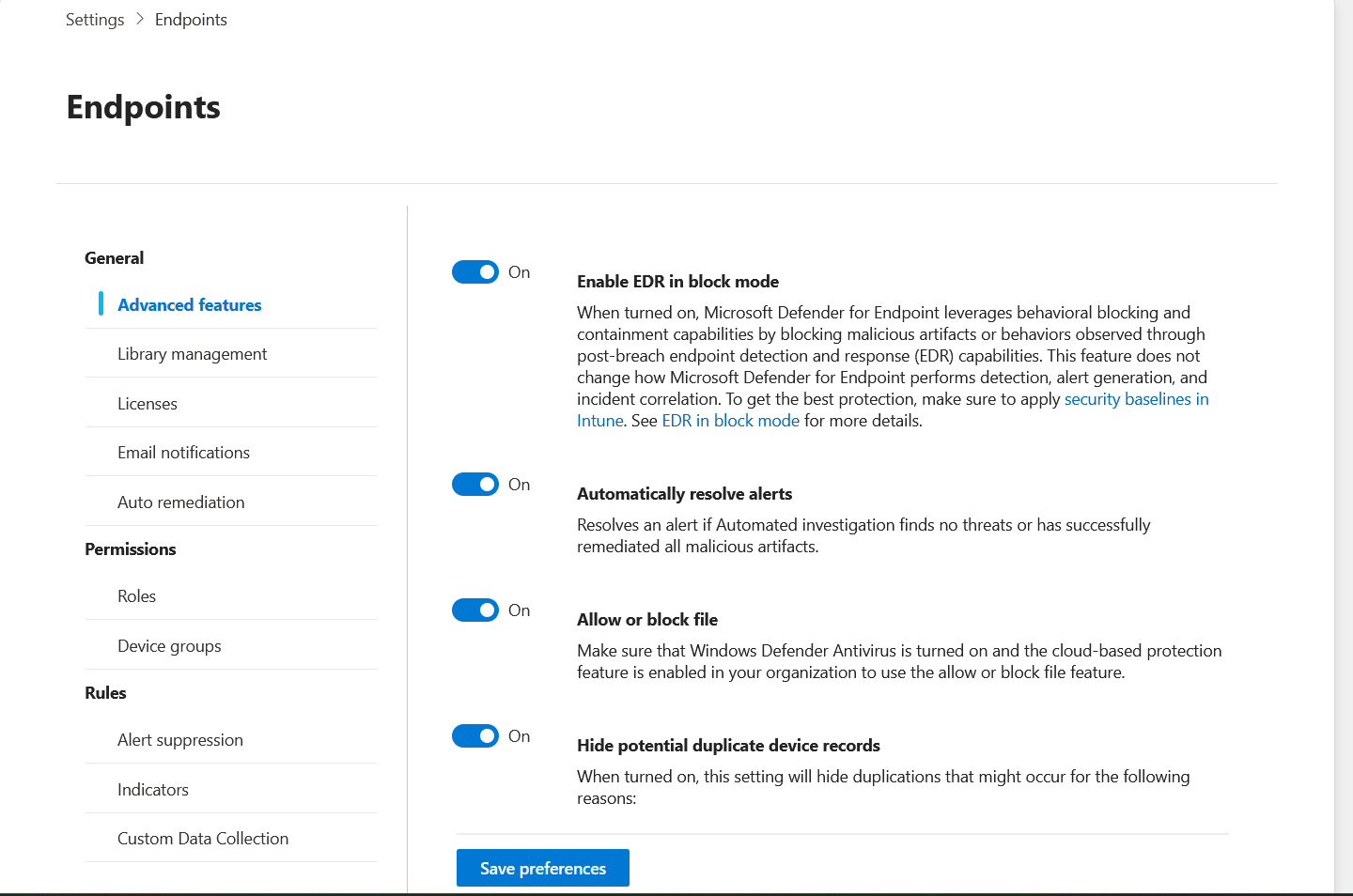
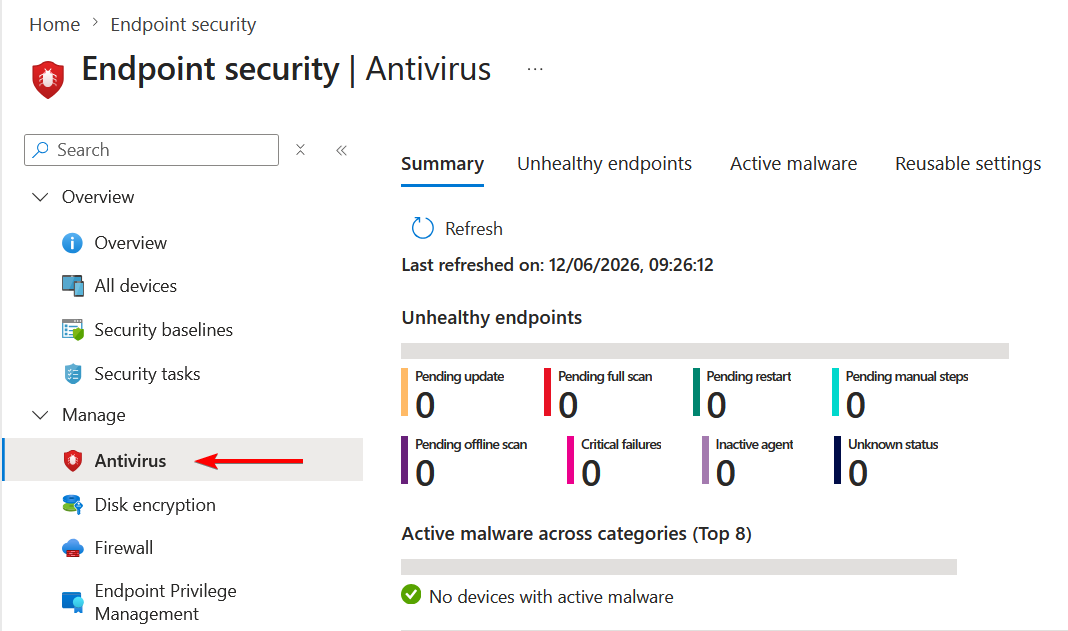
2. Antivirus settings
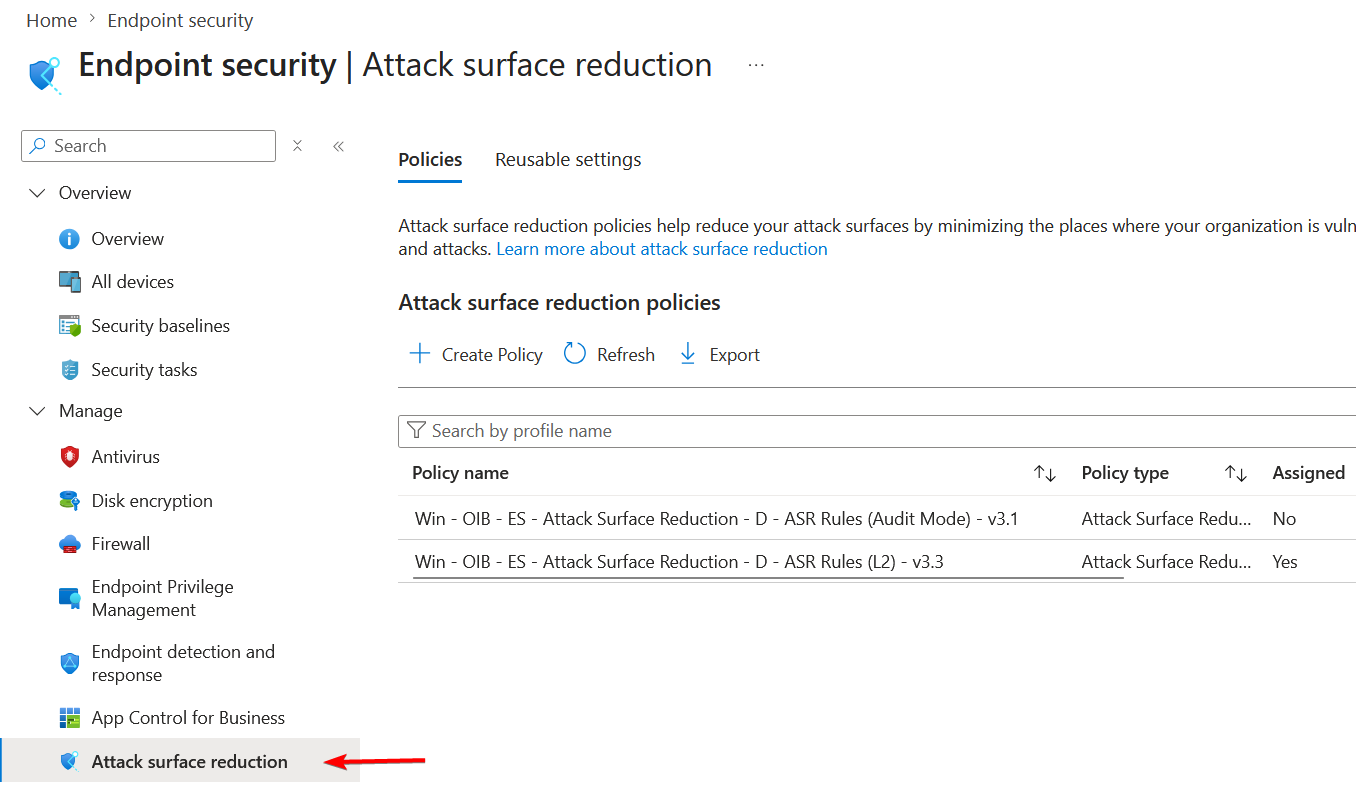
3. Attack Surface Reduction Rules
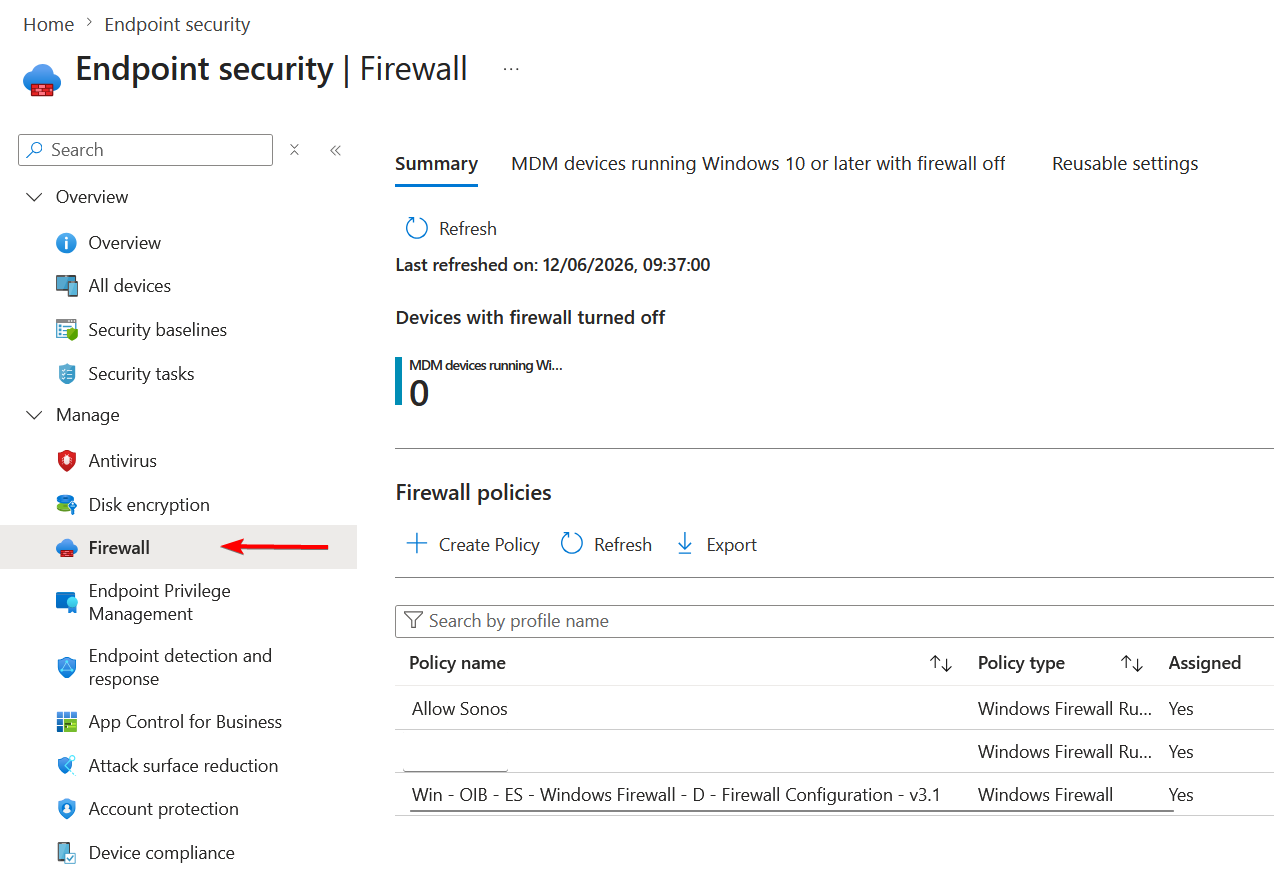
4. Firewall
Going further#
I'm trying to cover a one-size-fits-most with this guidance here, but there are additional layers you could add. For example:
- Controlled Folder Access - prevent stuff executing within common folders within the user & public profiles
- Account Protection - You can use this to Using Intune to remove Local Admins | Conditional Access
- App Control for Business - this is endgame, and I haven't yet figured out how to guide people using the Microsoft tooling, the easier option is to buy ThreatLocker
Resources#
- For a total overview of Defender settings, Ru Campbell's video has got you covered -
- For my written guide on how to deploy Defender for Windows - How to deploy Defender for Endpoint: Windows | Conditional Access
- For my guide on ASR rules - Attack Surface Reduction - Action Required! | Conditional Access
- For a good baseline of settings that further extends to Windows itself - OpenIntuneBaseline - Community-Driven Endpoint Security
- How to buy Defender for Endpoint
The biggest crime#
Is having Defender for Endpoint included in your bundle licensing and not using it. You're often paying twice, and losing on multiple fronts. Hopefully now you will at least Consider IT.